You built it on a canvas. OpenAI handed you back code. Get your canvas back.
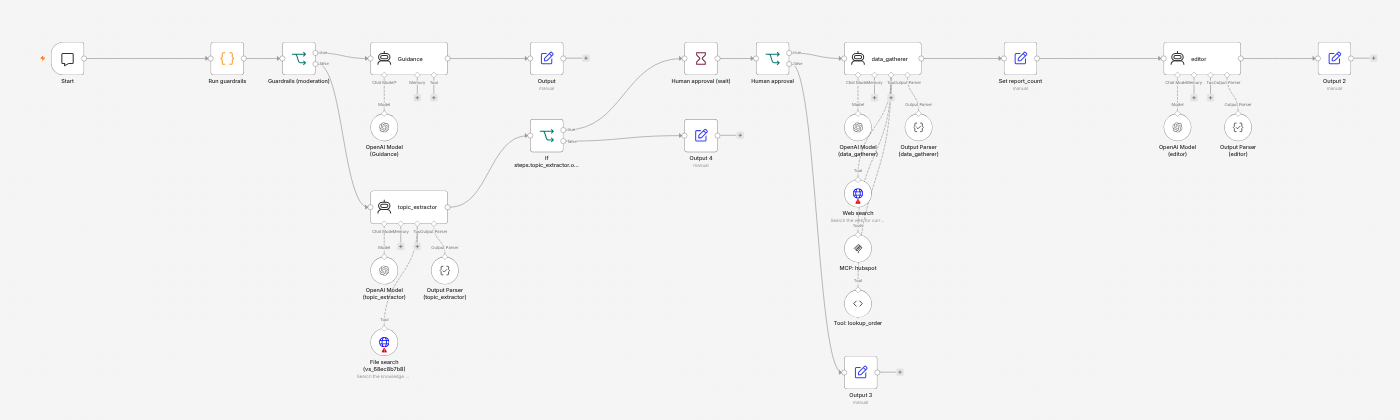
Agent Builder's only export is a block of Agents SDK code: no graph, no connections, no credentials, and every tool stubbed out. Paste that export here and get an n8n workflow you can import and see, every agent, branch, tool and approval step in place, plus a migration checklist of what you still have to reconnect. A LangGraph version is included for teams that prefer code. Free preview, pay only to download.
Your code is processed in memory for the conversion and discarded after an hour. It is never stored or used for anything else.
Results appear here.
FAQ
What exactly gets converted?
Every Agent(...) (name, instructions, model, reasoning effort, tools, structured-output schema), file search / web search / MCP / code-interpreter / function tools, guardrails, if/else branches, state variables, and human-approval steps. Handoffs and dynamic instructions are mapped where possible and flagged where not. Loops and Transform nodes are left as marked TODOs rather than guessed.
Will the n8n JSON import cleanly?
Yes — it is a standard n8n workflow export using the AI Agent, OpenAI Chat Model, Structured Output Parser, If, Wait, Set, Code, HTTP Request Tool and MCP Client Tool nodes (n8n ≥ 1.88). You still have to pick your OpenAI credential on the nodes marked REPLACE_ME and implement any tool that Agent Builder exported as a stub.
Why LangGraph via the Responses API instead of the Agents SDK?
Because the Responses API keeps file search, web search, MCP and code interpreter as native OpenAI tools, which is the closest behavioural match to Agent Builder, while LangGraph gives you real control flow, checkpoints and human-in-the-loop pauses. If you'd rather stay on the Agents SDK, the export you already have is that.
What if the conversion misses something in my workflow?
The report says exactly what was and wasn't converted. If a real export breaks the converter, email the address in the footer with the export and you get a fix plus a refund if we can't handle it within 48 hours.
Multiple workflows / agency?
Each license key converts unlimited workflows for 30 days — you can run your whole client list through it.